
Executive Toolbox: Concordia’s Library System (eMBA)
Executive Toolbox: Concordia’s Library System (eMBA)
When researching a business topic or launching a new venture, information about industries, markets or competitors can be invaluable for MBA or EMBA students. In this session, we will cover resources from the Internet as well as licensed market and industry intelligence databases available from Concordia University Library. This is a workshop adapted from the “Entrepreneurship” course at the John Molson School of Business.
Direct link to the Business Research Portal (BRP) at Concordia University Libraries: https://www.concordia.ca/library/guides/business.html
The gist: for trade or research articles use ProQuest Business; for industry data & reports for Canada, the USA, China and the World use IBISWorld; for consumer reports and data use Passport by Euromonitor. Find these and more on the Business Research Portal (BRP) at Concordia University Libraries.
Source: Business Research Portal (BRP) at Concordia University Libraries
LEARNING OBJECTIVES
- Leverage scientific evidence for business success
- Locate industry and market reports from the Internet and the Library
- Understand how to use datasets from Statistics Canada (Census & Data) and other national agencies
- Develop a healthy information diet
COURSE OUTLINE
- Finding sources with strong evidence to support claims
- Articles: evidence from science and news
- Know your market & industry: reports from IBIS Wrold; SME Benchmarking; Mergent Intellect
- Using Google for business research: trade associations & governments
- Statistics Canada for entrepreneurs: Census & CANSIM
- Library services
1. Finding sources with strong evidence to support your business or academic claims
When making a claim in a paper or a presentation, you need to locate and cite the best source with strong evidence. To navigate the breadth and depth of the information universe, you need to recognize certain social, economic or political processes at play. Here is a simple framework to tap into various information lifecycles:
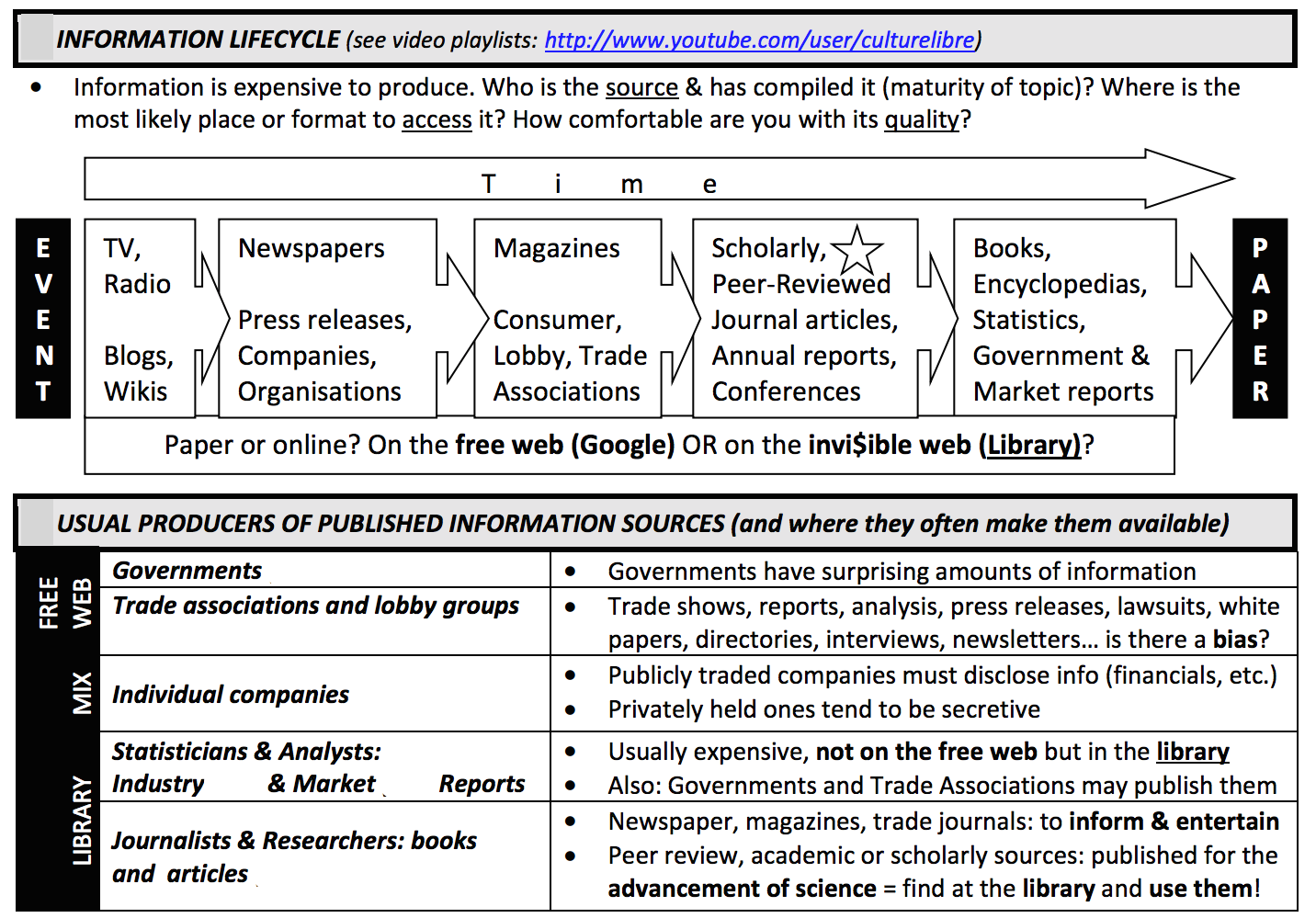
2. Articles: evidence from science and news news
Getting started: read articles from encyclopedias such as Wikipedia or International encyclopedia of the social & behavioral sciences to get a sense of the literature. Look at the jargon used, navigate the “see also” links and download the articles cited therein. Books, such as your textbook, handbooks or monographs from Sofia, the library catalogue, are also relevant. Remember: do not cite encyclopedia articles, you have to access the peer-reviewed articles cited in encyclopedia entries!
Three words about Generative Artificial Intelligence: plagiarism; hallucinations and empowerment.
Now that we’ve sorted out some details, here are some tools and tips for locating business intelligence from articles:
- Think about your business idea when searching, use a variety of keywords:
- (1) industry (use NAICS, watch out for jargon)
- (2) trade associations
- (3) market leaders and major competitors
- (4) brands, market segments, consumer groups or profiles
- (5) other subject term like a business trend
- News and articles from the Library, better than Google News
- Scholarly vs. Trade v. News articles
- Sofia (library catalogue) for books and scholarly articles
- ProQuest Business Databases: more Canadian content
- EBSCO’s Business Source Complete: research and some current events
- Factiva.com: news sources & company profiles from Dow Jones
- Eureka.cc: French-language local news
- Setup an RSS feeds from ProQuest, EBSCO and Google to automatically receive notifications
Remember: you have to cite anything that you haven’t written, such as copy-pasting from a source or a response from a chatbot.
3. Know your market & industry: reports from IBIS Wrold; SME Benchmarking; Mergent Intellect
- IBIS World (also part of the Industry Information on the BRP)
- Industry reports for Canada, USA, China and Global, filed by NAICS Code.
- Library subscription, expensive reports provided for free by Concordia
- Direct link to the video for this step
- Passport by Euromonitor (also part of Market analysis on the BRP)
- Consumer lifestyles by <country>
- Search > search full tree > topics & geographies
- OECD iLibrary (also part of the Country profiles)
- OECD Economic Surveys: Canada
- Mergent Intellect (lists of companies, aka business directories on the BRP)
- Also called Dun&Braadstreet
- Library subscription, expensive reports provided for free by Concordia
- Find competitors, clients, suppliers, market leaders
4. Using Google for business intelligence: trade associations and government reports
- Find trade associations with Google
- They post a lot of industry/market information on their websites
- Trade shows, reports, analysis, press releases, lawsuits, white papers, directories, interviews, newsletters… is there a bias?
- Watch the video for this step
- Find government information with Google’s advanced search
- Most government websites follow a standardized format for their addresses
- Governments study and regulate many topics relevant for new business
- Example: 2022 Communication Markets Report from the Canadian Radio-television and Telecommunications Commission (CRTC)
| Government Level | Example of “Site/domain” | Tip |
| Municipal | .ville.montreal.qc.ca | Look for “Montréal en statistiques” page for information for boroughs |
| Provincial | .gouv.qc.ca | The province deals with mainly: health, education, welfare, culture, agriculture/food… |
| “Federal” | .gc.ca .gov europa.eu | Always check for reports from Industry Canada at site:.ic.gc.ca |
| International | un.org or other agency | Agencies affiliated with the United Nations have their own website |
5. STATISTICS CANADA FOR ENTREPRENEURS
- Statistic Canada – NOT IN GOOGLE
- 2021Census
- Census Profile: makup of a “place” in Canada
- Data tables: Counts of Canadians by demographic variables
- Data from StatCan
- All other data tables available from StatCan
- Some useful searches: household spending; retail trade sales; labour force survey; Neighbourhood income and demographics; family income; NAICS Statistics
- Click on “Add/remouve data” when looking at a data table to toggle data dimensions
- Watch the YouTube video for this step
- 2021Census
- SimplyMap Canada (not covered)
- Color density map based on data from Statistic Canada
- Watch the video for this step
6. Library Services
As graduate students, you are afforded a vast array of spaces, services and collections!
Ask questions! For example, you can chat live with a library staff right now. Olivier’s email is on the Business Research Portal.